GoHighLevel Snapshot vs. Custom Build: Which Is Right for Your Agency?
What a Snapshot Actually Gives You
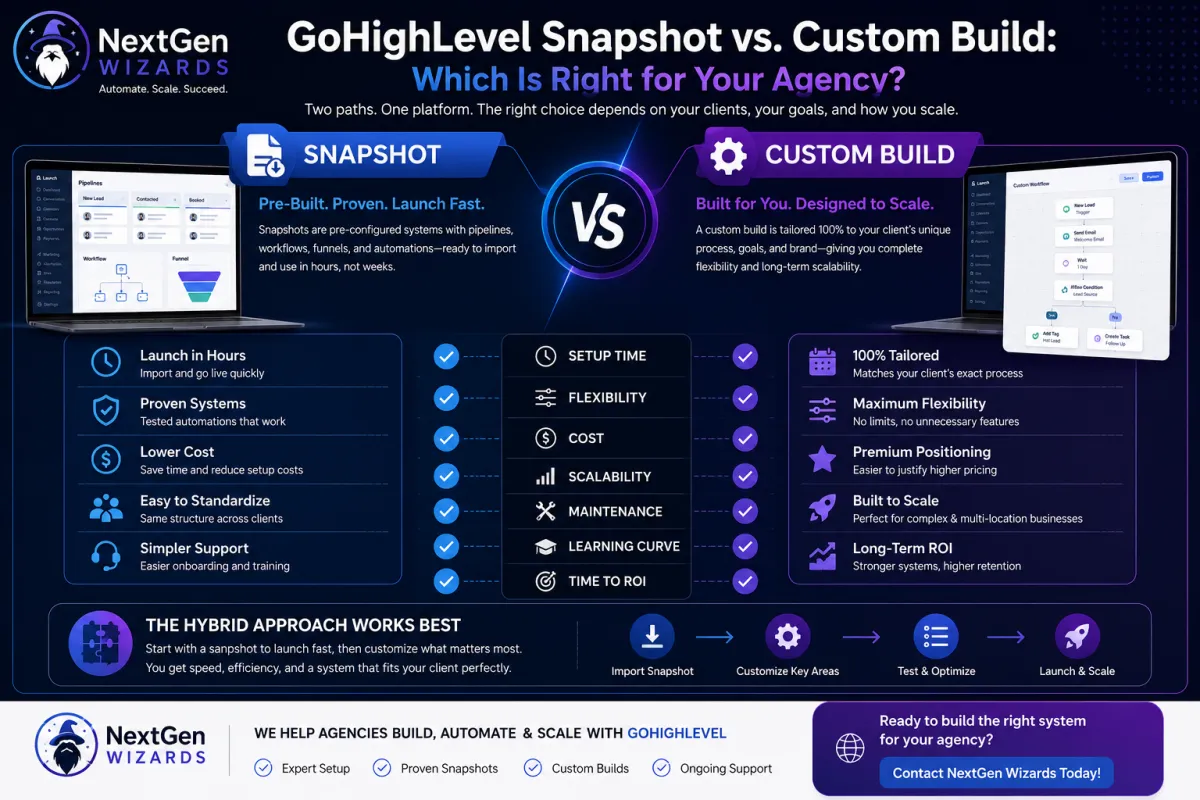
A snapshot is a pre-configured package of pipelines, workflows, funnels, and automations built for a specific niche or use case. Instead of building a follow-up sequence, a booking calendar, and a review-request automation one piece at a time, you import a snapshot and most of that structure is already there.
•Launch a new client account in hours instead of weeks
•Proven automation logic, tested across multiple accounts
•Lower setup cost per client, since the heavy lifting is already done
•Easier to standardize support, since every account follows the same structure
What a Custom Build Gives You
A custom build starts from a blank sub-account and is shaped entirely around one client’s process their exact sales stages, their specific follow-up cadence, their branding down to the last automation email.
•Pipelines match the client’s actual sales process instead of a generic template
•No unused features or irrelevant automations cluttering the account
•Easier to defend premium pricing, since the work is visibly bespoke
•Better fit for complex businesses (multi-location, multi-service, franchise models)
Cost and Speed Comparison
Snapshots are almost always cheaper and faster to deploy. A well-built niche snapshot can take a new client live in a single onboarding call, while a custom build typically takes anywhere from one to three weeks depending on complexity. If your agency serves a high volume of similar businesses say, local service providers or single location retailers a snapshot pays for itself immediately. If your client roster is a mix of very different business models, forcing them all into one snapshot usually creates more support tickets than it saves.
The Hybrid Approach Most Agencies Land On
In practice, the agencies that scale fastest don’t pick one model exclusively. They start every client on a snapshot to get the account live fast, then customize the 10–20% that’s genuinely unique to that business. This keeps onboarding quick without forcing every client into an identical, generic system.
How to Decide for Your Agency
1.List your last 10 clients and count how similar their sales processes actually are.
2.If 7 or more overlap heavily, invest in one strong snapshot and customize the exceptions.
3.If your clients are highly varied, build a lightweight ‘core’ snapshot with the basics (pipeline, calendar, review requests) and layer custom automation on top per client.
4.Track time-to-launch and support tickets for both approaches over your next 5 onboarded clients to see which actually costs you less.
Signs You’ve Outgrown a Generic Snapshot
A snapshot that worked perfectly for your first five clients can start to strain as your roster grows or diversifies. Watch for these warning signs:
•Support tickets keep referencing automation steps that don’t apply to a particular client’s business
•You find yourself disabling half the workflows in every new sub-account before it’s usable
•Clients ask why their pipeline stages don’t match how they actually sell
•Onboarding calls run long because you’re explaining features the client will never use
Any one of these on its own is normal. Two or three happening consistently across multiple clients means it’s time to either rebuild your snapshot around your actual client base, or shift toward a hybrid model.
Real-World Example: Local Service vs. Multi-Location Retail
Consider two agencies, both running GoHighLevel. Agency A serves local service businesses plumbers, electricians, HVAC companies whose sales process is nearly identical: inbound call or form, quote, job scheduled, review request. A single well-built snapshot covers 90% of what every new client needs, and onboarding takes under an hour.
Agency B serves a mix of multi-location retail chains, each with different POS integrations, loyalty programs, and regional promotions. Forcing these clients into one snapshot means constant exceptions and rework. For Agency B, a lightweight core snapshot (contact fields, basic pipeline, calendar) plus a custom automation layer per client is the more sustainable model, even though it’s slower to launch.
The lesson: your snapshot strategy should mirror how similar your clients actually are not how convenient one approach would be if they were.
Building a Snapshot That Scales With You
1.Start with your most common client type and document every stage of their actual sales and delivery process before building anything.
2.Build the snapshot around that documented process, not a generic template pulled from a marketplace.
3.Leave clearly labeled ‘customize here’ sections in pipelines and automations so future edits don’t require rebuilding from scratch.
4.Re-audit the snapshot every quarter against your actual client mix — snapshots go stale as your ideal client profile shifts.
5.Keep a short list of the most common custom additions you build per client; if the same addition shows up in 3+ accounts, fold it into the base snapshot.
Frequently Asked Questions
Can I switch a client from a custom build to a snapshot later?
Yes, but it’s more work than starting on a snapshot from day one. You’ll need to map existing pipeline stages and automations onto the new structure, and notify the client of any workflow changes before they take effect.
Do snapshots hurt how ‘custom’ my agency looks to prospects?
Not if you position it correctly. Clients care about outcomes and responsiveness, not whether the underlying automation is templated. The visible parts of the experience branding, communication, results can still feel entirely custom even when the technical foundation is a proven snapshot.
How often should I update my agency’s core snapshot?
Most agencies review and refresh their core snapshot every 90 days, incorporating lessons from recent onboardings, new GoHighLevel features, and any recurring client requests.
Final Take
There’s no universally correct answer here the right choice depends on how repeatable your client base is. What matters is that you’re deliberate about it. Agencies that never plan their snapshot strategy end up rebuilding the same automations over and over, which is time you could be spending on new client acquisition instead.
Need help deciding between a snapshot and a custom build for your next client? NextGen Wizards’ certified GoHighLevel specialists can audit your current setup and recommend the fastest path to a system that actually fits your business.