GoHighLevel’s AI Employee Explained: What Actually Changes for Your Agency
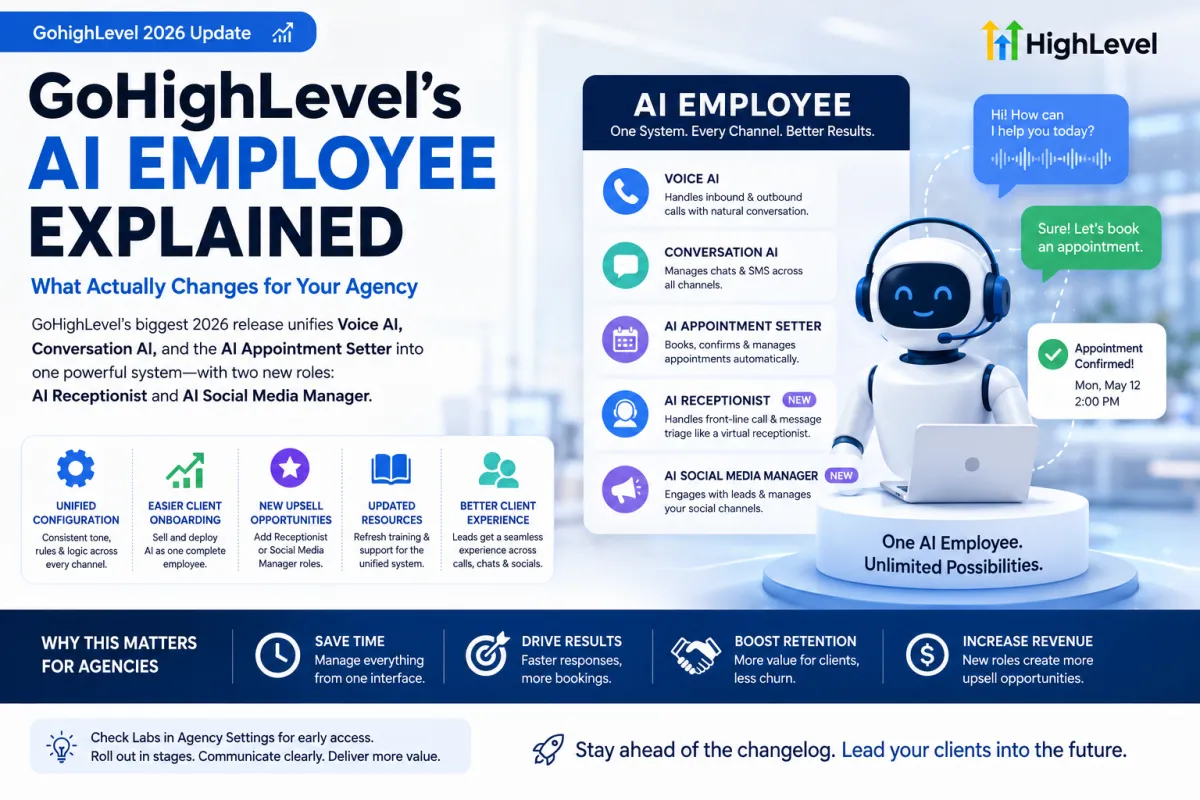
GoHighLevel’s biggest 2026 release so far is the AI Employee a unified system that brings Voice AI, Conversation AI, and the AI Appointment Setter under a single interface, along with two new roles: AI Receptionist and AI Social Media Manager. For agencies, this isn’t just a rebrand of existing tools it changes how these AI features are configured, sold, and supported for clients.
What the AI Employee Actually Combines
•Voice AI — handles inbound and outbound phone calls with natural-sounding conversation
•Conversation AI — manages chat and SMS conversations across channels
•AI Appointment Setter — books and confirms appointments directly within conversations
•AI Receptionist — a new role designed to handle front-line call and message triage
•AI Social Media Manager — a new role extending AI handling into social channels
Why Unifying These Matters
Previously, agencies configured Voice AI, Conversation AI, and appointment booking as separate pieces, often with inconsistent behavior between channels a lead might get a different experience calling versus texting. Bringing these under one AI Employee framework means a single configuration governs tone, escalation rules, and business logic across every channel a client’s leads might use.
What This Means for Agencies Practically
1.Existing Voice AI and Conversation AI setups don’t necessarily disappear, but agencies should review how their current configurations map onto the new unified structure to avoid duplicate or conflicting logic.
2.New client onboarding can now be positioned around a single ‘AI Employee’ setup rather than separately selling and configuring three different AI tools.
3.The AI Receptionist and AI Social Media Manager roles open up upsell opportunities for existing clients who only adopted Voice AI or Conversation AI previously.
4.Support documentation and client-facing training materials built around the old separate tools will need updating to reflect the unified interface.
Rollout Considerations
Major GoHighLevel features frequently appear first in Labs under Agency Settings before reaching general availability, sometimes weeks ahead of the official changelog update. Agencies wanting early access to test configurations before rolling them out to clients should check Labs settings directly rather than waiting for a wider announcement.
Frequently Asked Questions
Do I need to reconfigure my existing Voice AI setup?
It’s worth reviewing your current setup against the new unified structure, since some settings may now be managed centrally through the AI Employee interface rather than per-tool.
Is the AI Employee available on all GoHighLevel plans?
Feature availability by plan tier changes as GoHighLevel rolls features out, so it’s worth confirming current plan-level access directly in your account before promising specific capabilities to clients.
Should I upsell this to existing clients or bundle it into new packages?
Both approaches work existing clients using only one piece (like Voice AI alone) are natural upsell candidates for the Receptionist or Social Media Manager roles, while new clients can be onboarded directly onto the unified framework from day one.
Getting Ahead of the Rollout
Being early to explain a major platform change to clients before they hear about it elsewhere and ask questions you’re not ready for is one of the simplest ways an agency builds trust. NextGen Wizards helps agencies map their existing GoHighLevel configurations onto new releases like the AI Employee, so client-facing communication stays ahead of the changelog instead of reacting to it.
A Realistic Migration Timeline
Agencies managing dozens of client sub-accounts shouldn’t try to migrate everyone to the unified AI Employee structure in a single week. A staged rollout protects against surprises in live client accounts.
1.Week 1: Test the unified structure in a single internal or low-stakes sandbox sub-account, mapping every existing Voice AI and Conversation AI setting to its new location.
2.Week 2: Migrate 2–3 friendly, engaged clients first ones likely to give quick feedback if something behaves unexpectedly.
3.Weeks 3–4: Roll out to the remaining client base in batches, prioritizing accounts with the simplest existing configurations first.
4.Ongoing: Keep a rollback plan documented for each client in case a specific automation behaves differently than expected post-migration.
How to Position This to Clients Without Overselling It
Clients don’t need a technical explanation of Voice AI, Conversation AI, and the AI Appointment Setter merging into one system they need to know what it means for their business. Framing this as ‘your AI team just got a coordinator’ tends to land better than a feature-by-feature rundown. For clients already paying for one or two of the underlying tools, the conversation is straightforward: nothing they’re paying for is being taken away, and two new capabilities (Receptionist and Social Media Manager roles) are now available to add if useful.