How to Use Workflow Automation to Save Time and Increase Revenue
In 2026, businesses are under constant pressure to operate faster, reduce manual work, and increase profitability. Whether you run a marketing agency, SaaS company, eCommerce store, healthcare clinic, or local service business, one challenge remains the same: too much time is wasted on repetitive tasks. This is where workflow automation becomes a game changer.
Workflow automation allows businesses to connect systems, automate repetitive processes, and ensure tasks are completed without manual intervention. Instead of spending hours sending emails, updating CRM records, following up with leads, or scheduling appointments, automation handles these tasks in the background. The result is simple: more efficiency, fewer errors, and higher revenue.
In this guide, we will explore how to use workflow automation to save time and increase revenue in 2026.
What Is Workflow Automation?
Workflow automation is the process of using software to automatically execute business tasks based on predefined triggers and actions.
In simple terms:
If X happens → Then Y automatically happens
For example:
-
If a customer fills out a form → send an email + SMS instantly
-
If a lead books an appointment → create CRM record + send confirmation
-
If a customer abandons cart → send reminder message
-
If a deal moves stage → notify sales team
Workflow automation is commonly used in CRM platforms like GoHighLevel, HubSpot, Salesforce, and Zoho CRM.
Why Workflow Automation Matters in 2026
Modern customers expect fast, personalized, and consistent communication. However, manual processes create delays and inefficiencies.
Without automation, businesses often face:
-
Missed leads
-
Slow response times
-
Human errors
-
Inconsistent follow-ups
-
High operational costs
Workflow automation solves these problems by ensuring every action happens instantly and consistently.
Key Benefits of Workflow Automation
1. Saves Time on Repetitive Tasks
One of the biggest advantages of automation is time savings.
Businesses often spend hours on tasks like:
-
Sending follow-up emails
-
Updating CRM records
-
Scheduling appointments
-
Sending reminders
-
Assigning leads
Workflow automation eliminates these manual tasks. Instead of doing repetitive work, teams can focus on strategy, sales, and customer relationships.
2. Increases Revenue Through Faster Lead Response
Speed is critical in sales. Studies show that businesses that respond to leads within minutes are far more likely to convert them.
Workflow automation ensures:
-
Instant lead response
-
Automatic follow-ups
-
Immediate SMS/email notifications
-
Quick appointment booking
This increases conversion rates and revenue.
3. Improves Customer Experience
Customers expect fast and seamless communication.
Automation helps deliver:
-
Instant confirmations
-
Appointment reminders
-
Order updates
-
Personalized messages
This improves satisfaction and builds trust.
4. Reduces Operational Costs
Hiring staff to manage repetitive tasks is expensive. Workflow automation reduces the need for manual labor by automating key processes.
This allows businesses to scale without significantly increasing costs.
5.Eliminates Human Errors
Manual work often leads to mistakes such as:
-
Missing follow-ups
-
Wrong data entry
-
Delayed responses
-
Incorrect customer information
Automation ensures consistency and accuracy in every process.
How Workflow Automation Increases Revenue
1. Better Lead Nurturing
Not all leads convert immediately.
Automation helps nurture leads through structured sequences such as:
-
Welcome emails
-
Educational content
-
Case studies
-
Offers and promotions
-
Follow-up reminders
This builds trust and moves leads toward purchase decisions.
2. Higher Conversion Rates
Automated follow-ups ensure no lead is forgotten.
Example workflow:
-
Lead submits form
-
Instant SMS sent
-
Email follow-up after 1 hour
-
Reminder after 24 hours
-
Sales call scheduled
This structured approach significantly improves conversions.
3. Increased Customer Lifetime Value
Automation helps businesses stay connected with existing customers through:
-
Upsell campaigns
-
Cross-sell offers
-
Loyalty rewards
-
Re-engagement messages
This increases repeat purchases and long-term revenue.
4. Reduced Cart Abandonment (eCommerce)
Automation helps online stores win back lost sales with abandoned
-
cart SMS,
-
a discount follow-up email
-
a final reminder
-
boosting revenue without extra ad costs.
Essential Workflow Automation Examples
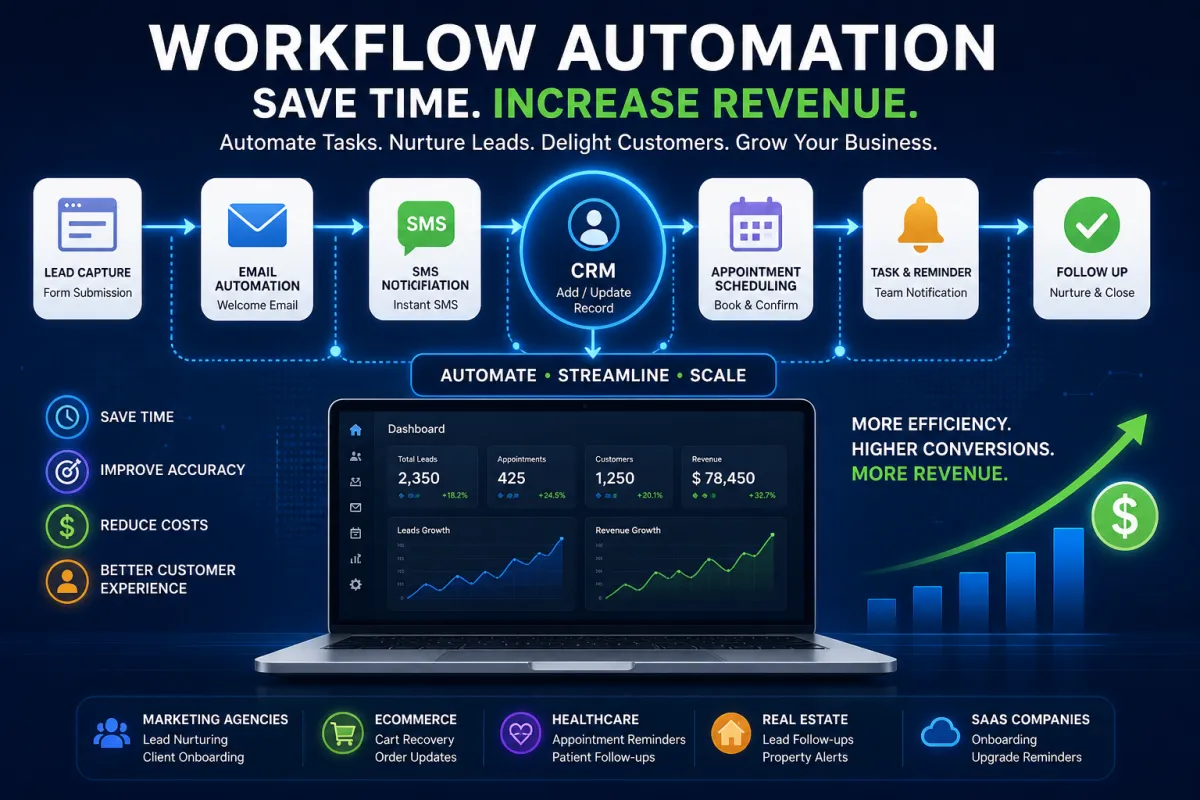
1. Lead Capture Automation
When a user fills out a form:
-
Add to CRM
-
Send welcome email
-
Send SMS confirmation
-
Assign sales rep
-
Trigger follow-up sequence
2. Appointment Booking Automation
When a customer books an appointment:
-
Send confirmation email
-
Send SMS reminder
-
Add event to calendar
-
Notify team member
-
Send post-appointment follow-up
3. Missed Call Text Back Automation
When a call is missed:
-
Send instant SMS response
-
Ask customer to book appointment
-
Notify sales team
-
Log call in CRM
4. Sales Pipeline Automation
When deal stage changes:
-
Notify sales team
-
Trigger email sequence
-
Update CRM status
-
Assign next task
5. Customer Onboarding Automation
When a customer buys a product or service:
-
Send onboarding email
-
Provide instructions
-
Share resources
-
Schedule training/demo
Best Tools for Workflow Automation in 2026
1. GoHighLevel
Best for agencies and all-in-one CRM automation.
Features include:
-
Funnels
-
SMS/email automation
-
CRM pipelines
-
Appointment scheduling
2. HubSpot
Best for inbound marketing and CRM workflows.
3. Zapier
Best for connecting multiple apps together.
4. Salesforce
Best for enterprise-level automation.
How to Build an Effective Workflow Automation System
Step 1: Identify Repetitive Tasks
List tasks that take time daily such as follow-ups, emails, or scheduling.
Step 2: Map Customer Journey
Understand how leads move from awareness to purchase.
Step 3: Set Triggers and Actions
-
Trigger: What starts the workflow
-
Action: What happens automatically
Step 4: Test Workflows
Before going live, test automation to avoid errors.
Step 5: Optimize Continuously
Track performance and improve workflows over time.
Common Mistakes in Workflow Automation
-
Overcomplicating workflows
-
Ignoring customer segmentation
-
Not testing automation
-
Sending too many messages
-
Failing to update workflows
Avoiding these mistakes ensures better performance.
Workflow Automation for Different Industries
Marketing Agencies
-
Lead nurturing
-
Client onboarding
-
Campaign reporting
eCommerce Stores
-
Cart recovery
-
Order updates
-
Upsell campaigns
Healthcare
-
Appointment reminders
-
Patient follow-ups
Real Estate
-
Lead follow-ups
-
Property alerts
SaaS Companies
-
Trial onboarding
-
Upgrade reminders
Future of Workflow Automation in 2026
Automation is becoming more advanced with:
-
AI-powered workflows
-
Predictive automation
-
Hyper-personalized messaging
-
Voice-based triggers
-
Smart CRM systems
Businesses that adopt automation early will outperform competitors.