The Ultimate CRM Setup Checklist for Small Businesses in 2026
Introduction
Customer relationships are the foundation of every successful small business. Whether you run a marketing agency, medical clinic, law firm, real estate company, or home service business, managing customer information efficiently can make the difference between steady growth and missed opportunities.
Many small businesses begin by storing customer information in spreadsheets, notebooks, or scattered software applications. As the business grows, these methods become difficult to manage. Important conversations get lost, follow-ups are forgotten, and sales opportunities slip away.
A Customer Relationship Management (CRM) system solves these challenges by organizing customer information in one centralized location. It allows businesses to track leads, manage sales opportunities, automate communication, schedule appointments, and improve customer service.
However, installing a CRM is only the first step. Proper setup determines how effectively the system supports your business operations. A well-configured CRM improves productivity, enhances customer experiences, and provides valuable insights into business performance. This checklist outlines the essential steps every small business should follow when setting up a CRM in 2026.
Why Every Small Business Needs a CRM
A CRM is more than just a digital contact list. It acts as the central hub for customer interactions, sales activities, and business communication.
Instead of searching through emails, spreadsheets, or handwritten notes, employees can instantly access complete customer histories, ongoing deals, previous conversations, appointments, and important documents.
Benefits of using a CRM include:
-
Better customer organization
-
Faster response times
-
Improved sales management
-
Increased productivity
-
Better collaboration among teams
-
Automated repetitive tasks
-
More accurate reporting
-
Stronger customer relationships
Even businesses with only a few employees can benefit significantly from a properly configured CRM.
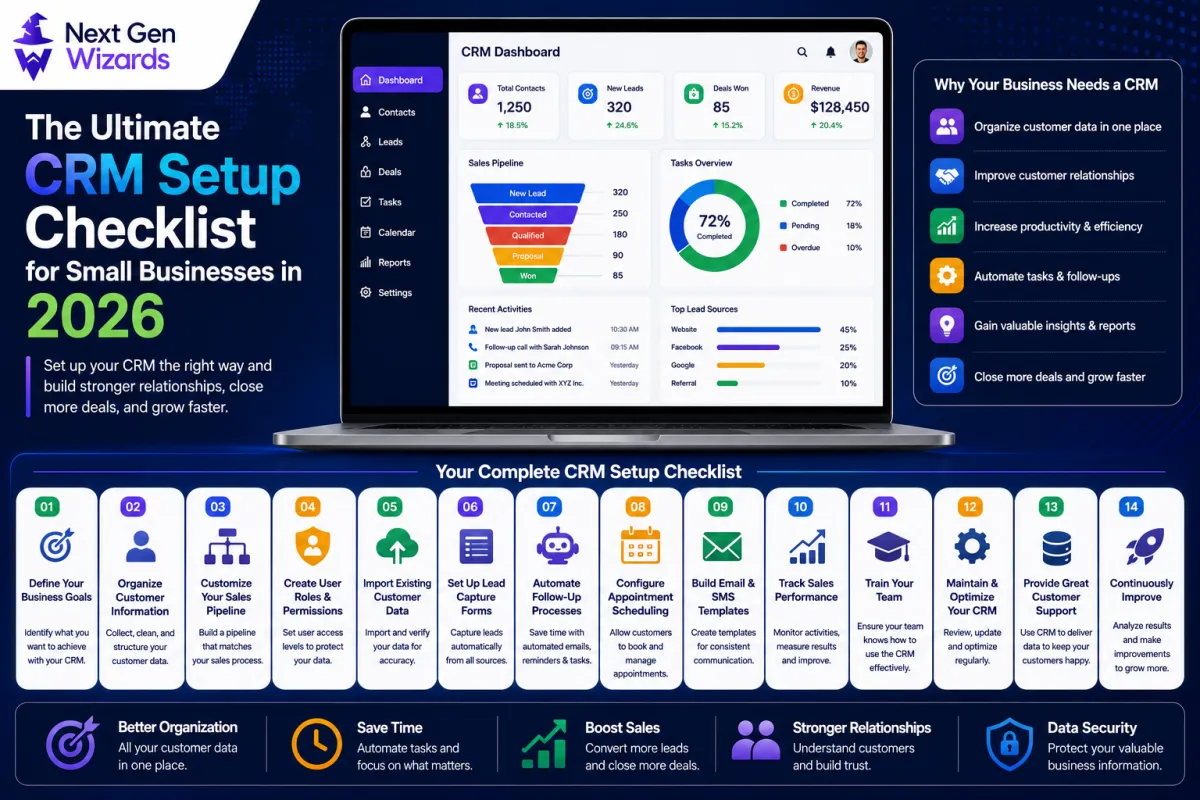
1. Define Your Business Goals
Before setting up any CRM, identify what you want the system to accomplish.
Different businesses have different priorities.
For example:
-
Increase lead conversions
-
Improve customer retention
-
Reduce manual work
-
Track sales performance
-
Automate follow-ups
-
Organize customer communications
-
Improve appointment scheduling
Clearly defined goals help determine which CRM features deserve the most attention during setup. Without clear objectives, businesses often configure unnecessary features while overlooking important ones.
2. Organize Customer Information
A CRM is only as useful as the quality of its data. Before importing information, organize customer records carefully.
Collect essential information such as:
-
Full name
-
Company name
-
Email address
-
Phone number
-
Business address
-
Customer status
-
Lead source
-
Purchase history
-
Notes
-
Communication preferences
Consistent formatting makes searching, filtering, and reporting much easier. Removing duplicate records before importing also improves long-term CRM performance.
3. Customize Your Sales Pipeline
Every business follows its own sales process. A CRM should reflect your workflow rather than forcing your business into a generic structure.
Typical pipeline stages include:
-
New Lead
-
Contacted
-
Qualified
-
Meeting Scheduled
-
Proposal Sent
-
Negotiation
-
Closed Won
-
Closed Lost
Clearly defined stages help sales teams understand exactly where each opportunity stands. Pipeline customization also improves forecasting and performance reporting.
4. Create User Roles and Permissions
Not every employee needs access to every part of the CRM. Assigning appropriate user roles improves both security and efficiency.
Examples include:
-
Sales representatives may access customer records and opportunities.
-
Managers may view reports and performance dashboards.
-
Administrators can modify system settings and workflows.
-
Customer support teams may only require access to communication histories and customer profiles.
-
Limiting unnecessary access reduces the risk of accidental changes and protects sensitive business information.
5. Import Existing Customer Data
Most businesses already have customer information stored somewhere. Import this information carefully into the CRM.
Before importing:
-
Remove duplicate entries
-
Correct spelling mistakes
-
Standardize phone numbers
-
Verify email addresses
-
Delete outdated records
-
Merge duplicate contacts
Clean data improves reporting accuracy and automation performance. After importing, review several records manually to ensure information transferred correctly.
6. Set Up Lead Capture Forms
Generating leads becomes much more efficient when customer information enters the CRM automatically.
Create lead capture forms for:
-
Website contact pages
-
Landing pages
-
Consultation requests
-
Newsletter signups
-
Quote requests
-
Event registrations
Each submitted form should automatically create a new contact record, assign ownership, and trigger follow-up processes. Automated lead capture reduces manual data entry while ensuring no inquiries are overlooked.
7. Automate Follow-Up Processes
One of the biggest advantages of modern CRM systems is automation. Many customer interactions happen repeatedly and do not require manual effort.
Examples include:
-
Welcome emails
-
Lead acknowledgment
-
Appointment confirmations
-
Follow-up reminders
-
Review requests
-
Payment reminders
-
Customer onboarding
-
Re-engagement campaigns
Automation ensures timely communication while reducing administrative workloads. It also provides customers with faster and more consistent experiences.
8. Configure Appointment Scheduling
Businesses that rely on appointments should connect scheduling directly to the CRM.
Customers should be able to:
-
View available times
-
Book appointments
-
Receive confirmations
-
Reschedule bookings
-
Cancel appointments
Automated reminders reduce missed appointments while improving customer convenience. Calendar synchronization also prevents double bookings and scheduling conflicts.
9. Build Email and SMS Templates
Writing every customer message manually consumes unnecessary time. Prepare reusable templates for common situations.
Examples include:
-
Welcome messages
-
Appointment confirmations
-
Follow-up emails
-
Payment reminders
-
Thank-you messages
-
Customer surveys
-
Service updates
-
Birthday greetings
Templates ensure consistent communication while allowing employees to personalize important details quickly.
10. Track Sales Performance
A CRM provides valuable insights into business performance through reporting and analytics.
Monitor key performance indicators such as:
-
Number of new leads
-
Conversion rate
-
Average sales cycle
-
Revenue generated
-
Customer retention
-
Lost opportunities
-
Team productivity
-
Pipeline value
Regularly reviewing these metrics helps identify strengths, weaknesses, and opportunities for improvement. Data-driven decisions often lead to better long-term business growth.
11. Train Your Team
Even the best CRM cannot improve business performance if employees do not use it properly.
Provide practical training covering:
-
Contact management
-
Pipeline updates
-
Task creation
-
Appointment scheduling
-
Note-taking
-
Reporting
-
Automation usage
Encourage employees to keep customer records updated after every interaction. Consistent usage ensures accurate information across the organization.
12. Maintain and Optimize Your CRM
CRM setup is not a one-time project. Businesses evolve, and CRM systems should evolve alongside them.
Regular maintenance includes:
-
Removing duplicate records
-
Updating customer information
-
Reviewing automation workflows
-
Adjusting sales pipelines
-
Monitoring reports
-
Improving templates
-
Adding new integrations
-
Reviewing user permissions
Routine optimization ensures the CRM continues supporting business growth efficiently.
Frequently Asked Questions
What is a CRM?
A Customer Relationship Management (CRM) system is software that helps businesses manage customer information, track sales opportunities, automate communication, and improve customer relationships.
Why do small businesses need a CRM?
A CRM centralizes customer information, improves organization, reduces manual work, increases sales efficiency, and helps businesses provide better customer service.
How long does CRM setup take?
Basic CRM setup can often be completed within a few days, while larger businesses with complex workflows may require several weeks to fully configure and optimize their system.
What information should be stored in a CRM?
Customer names, contact information, communication history, appointments, sales opportunities, notes, purchase history, and task reminders are commonly stored within a CRM.
Can CRM systems automate customer communication?
Yes. Modern CRM platforms can automate emails, SMS messages, appointment reminders, follow-ups, customer onboarding, payment reminders, and many other repetitive communication tasks.
Conclusion
A properly configured CRM provides small businesses with a structured and efficient way to manage customer relationships, organize sales activities, and automate routine processes. By defining clear business goals, maintaining accurate customer data, customizing sales pipelines, automating follow-ups, managing appointments, tracking performance, and regularly optimizing the system, businesses can improve productivity while delivering a more consistent customer experience. Investing time in a thorough CRM setup creates a strong operational foundation that supports long-term growth and helps small businesses compete more effectively in an increasingly digital marketplace.